
Contact and Trip Requests
Use customer actions from the tracking page without sharing private account details.
The tracking page can show an action panel for practical trip updates. Available actions depend on what the operator enabled for your trip.
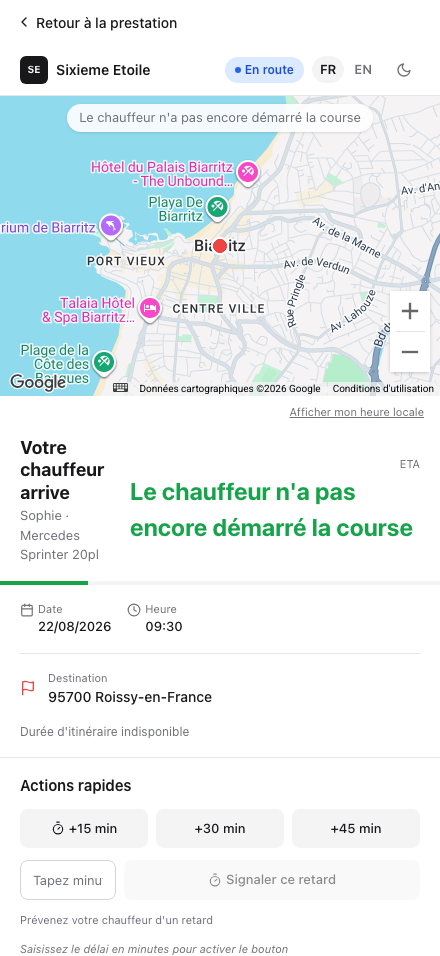
Delay or Message
Use the delay action to tell the operator and driver that you are running late. Choose a preset delay when available, or enter a custom delay if the page allows it.
Use the message action for short practical details, such as the exact meeting point. Keep messages focused on the current pickup.
Passenger and Luggage Requests
If passenger or luggage request controls are visible, use them to ask for a change. The request may need operator validation before it is accepted.
A request is not always an immediate confirmation. Wait for the response shown on the page or confirmation from the operator before treating the change as accepted.
Share Your Location
When the page offers location sharing, use it only if you want to help the driver find you. Your location is used for this trip context.
Call or Text the Driver
Call or text buttons appear only when the operator has shared a driver phone number for this trip. If no number is visible, contact the operator using your booking confirmation.
For date, time, address, cancellation, or payment changes, contact the operator directly.
Good Practices
Keep messages short and related to the current trip: exact exit, arrival hall, visible clothing, a short delay, or meeting point. Do not send payment information, personal documents, or requests that require commercial validation.
If the situation becomes urgent, call the operator or use the number provided in your booking confirmation.