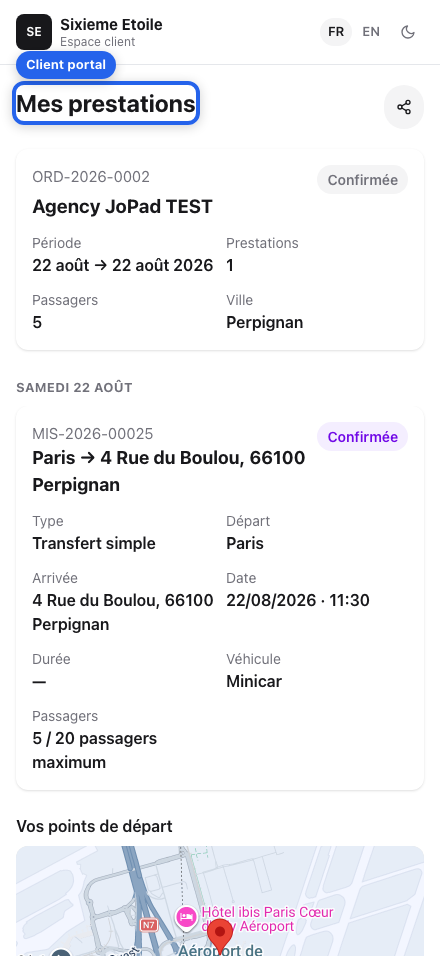
My Services
Check your booked trips from a link received by email or SMS, no account needed.
What "Mes prestations" is
"Mes prestations" ("My services") is the page you receive by email or SMS to check the trips booked with your transport operator: dates, times, pickup and drop-off locations, and — depending on what the operator chose to share — the driver and vehicle. No account is needed: the link is enough.
The link may cover a single prestation or every prestation in one booking, depending on what your operator chose to share with you.
What this page never shows
This page never shows a price, an invoice, a quote, or anything related to payment. It exists only to track the organisation of your trips. For any question about an amount, an invoice, or a payment, contact your operator directly.
What you see
The page groups your prestations by day, with an overview of the covered period, the number of prestations, the number of passengers, and the city. An upcoming prestation is highlighted with its pickup location, time, and a countdown.
Opening a prestation shows the trip from your point of view — the time you actually spend in the vehicle, never the driver's approach or return trips, and never his breaks.
Driver and vehicle — depending on what the operator shares
Each option is closed by default; your operator chooses to open it, per prestation if needed:
- Driver identity — name and, if enabled, a way to contact them;
- Live position — only once the trip has actually started, never before departure;
- Vehicle model;
- License plate.
If the driver or vehicle does not appear, it may simply mean the operator has not assigned anyone yet — the page does not tell you which of the two situations applies, by design, for discretion.
For a prestation subcontracted to a partner, the plate and direct driver contact are never shown, even if the operator enabled those options for the rest of the booking.
A stay in several steps
If your booking is a stay (several linked trips over several days), the page automatically breaks the stay down into its steps within the same prestation — there is nothing special to do, just open the relevant prestation.
Live tracking
Once a prestation actually starts, a live-tracking button becomes available from the page — it takes you to the same real-time tracking map used for a regular tracking link.
Validity, expiry, and revocation
The link you received has a validity period shown on the page itself — two weeks, one month, two months, or a custom period chosen by the operator. Once that period passes, the page shows an expiry message and no longer shows any data.
Your operator can also revoke a link before its normal expiry, or renew it — a renewal generates a new link: the old one stops working immediately. If you received several links at different dates, always use the most recent one.
If the link no longer works (expired, revoked, or unknown), the page shows an explanation and a generic operator contact — never any detail about your booking once the link is no longer valid.
Getting or renewing this link
You cannot create this link yourself: your transport operator generates it and sends it to you. If you did not receive one, or yours expired and you need a new one, contact your operator directly.